

Last summer, I spent an entire Saturday afternoon building custom storage cabinets for my garage. Four sheets of expensive birch plywood sat on my sawhorses, ready to go. My first rip cut looked great on top—until I flipped the sheet over. The bottom edge looked like a beaver had chewed through it. Massive tearout, splintered veneer, and edges I’d have to hide or replace. That frustrating disaster taught me something crucial: cutting plywood isn’t just about having a circular saw—it’s about having the RIGHT saw paired with the RIGHT blade and technique.

If you’re tackling kitchen cabinets, building furniture, or constructing shelves, you know plywood cutting demands precision. Unlike dimensional lumber that hides rough cuts behind drywall, plywood edges are often visible. Tearout and splintering ruin the clean look you’re going for.
After six years of woodworking—building everything from entertainment centers to workshop storage—I’ve learned which circular saws actually deliver clean plywood cuts. This isn’t about regurgitating manufacturer specs. This guide shares real-world experience breaking down hundreds of plywood sheets across dozens of projects.
Why Plywood Demands a Different Cutting Approach
Plywood isn’t solid wood. It’s thin veneer layers glued together with alternating grain directions. This construction creates strength, but it also creates cutting challenges that don’t exist with regular lumber.
The Tearout Problem
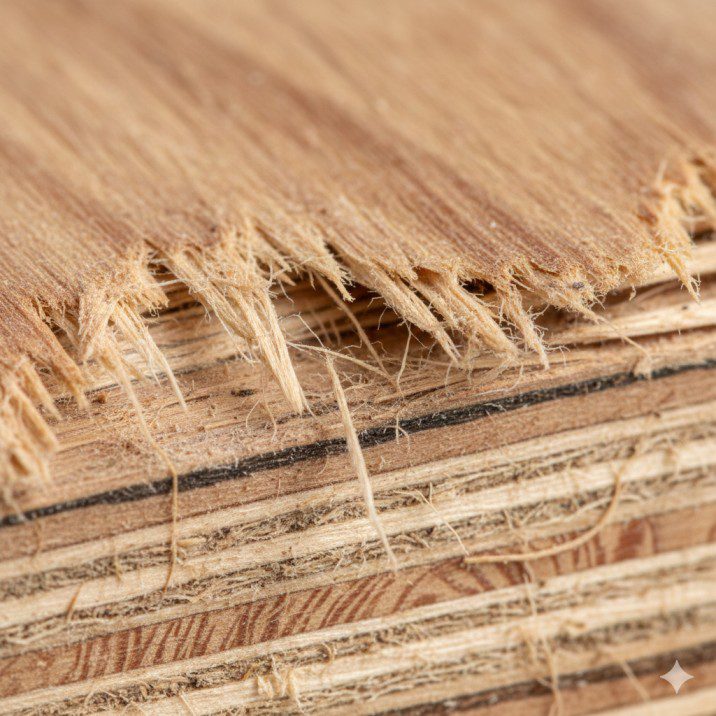
When a circular saw blade exits the bottom of plywood, it wants to lift and tear those thin veneer fibers. If the blade isn’t sharp enough or has too few teeth, you get ugly splintering where the blade exits. I’ve seen people try to hide this tearout by facing the “good side” up during cutting—but that only works if you’re okay with the bottom being destroyed.
The solution isn’t hoping for the best. It’s using a blade specifically designed for plywood with a high tooth count (60-80 teeth) and fine cutting geometry that shears cleanly through those delicate veneer layers.
Sheet Size Challenges
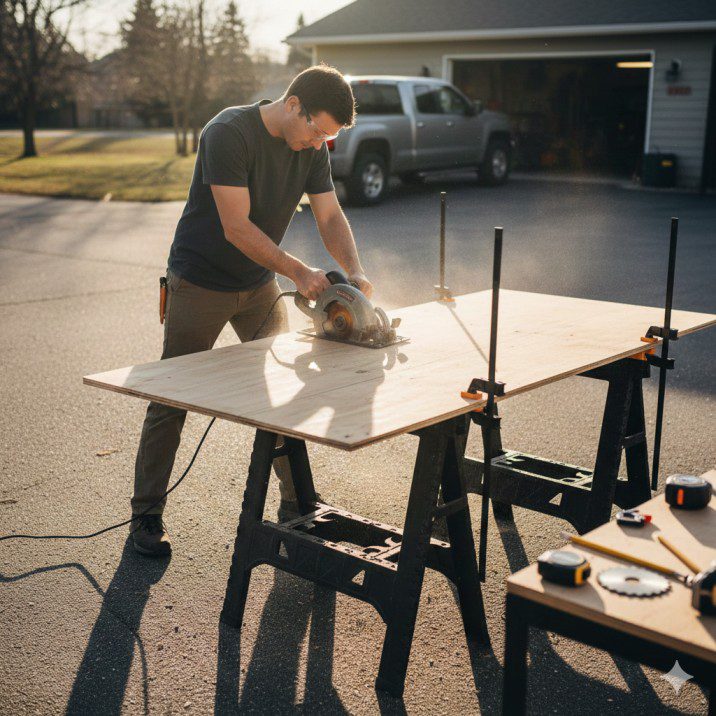
A 4×8 sheet of 3/4-inch plywood weighs about 60 pounds. Trying to maneuver that onto a table saw alone is how people hurt their backs or worse. Breaking down full sheets safely requires bringing the saw to the material.
This is where circular saws shine. You can lay the plywood on sawhorses or even on your driveway with foam insulation underneath, then make cuts safely without wrestling heavy sheets.
I’ve broken down literally hundreds of plywood sheets this way. It’s faster, safer, and requires way less workshop space than a table saw big enough to handle full sheets.
Grain Direction Matters
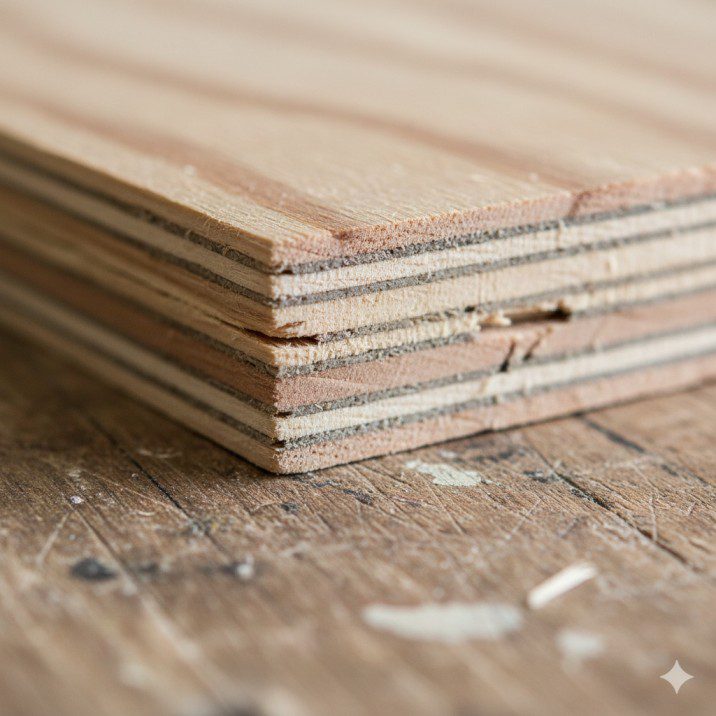
Unlike solid wood where you’re always cutting across or with the grain, plywood has grain running in multiple directions in each sheet. This means your blade encounters constantly changing resistance as it cuts through different veneer layers.
A blade that’s too aggressive will tear the cross-grain veneers. A blade that’s too slow will overheat and potentially burn the edges. The best circular saw for cutting plywood delivers consistent power without bogging down in changing grain conditions.
Top Circular Saws for Plywood Cutting [2026 Models]
These saws deliver the power, accuracy, and features that make plywood cutting manageable rather than miserable.
1. Makita 5007MG Magnesium Circular Saw – Best Overall for Plywood

Makita 5007Mg Magnesium 7-1/4-Inch Circular Saw
- Magnesium components create a lightweight saw (10.6 pounds) that is well balanced and jobsite tough
- Powerful 15.0 AMP motor delivers 5,800 RPM for proven performance and jobsite durability
- Two built in L.E.D lights illuminate the line of cut for increased accuracy
New starting from: 199.00 $
Go to AmazonPrice: ~$160-180 | Blade Size: 7-1/4 inch | Weight: 10.6 lbs | Power: 15 amp corded
This is my go-to saw for plywood cutting, and it’s the one I recommend most often to fellow woodworkers.
Why it’s perfect for plywood:
- 5,800 RPM delivers consistent speed through plywood’s varying grain directions
- Magnesium base is lighter than steel but still perfectly flat for accurate cuts
- Built-in LED lights illuminate cut lines on darker plywood surfaces
- Dust blower keeps sawdust off your cut line—critical for following pencil marks on plywood
- 15-amp motor never bogs down, even ripping 3/4-inch hardwood plywood
Real-world plywood experience: I’ve used my Makita 5007MG to build three sets of garage cabinets, an entire bedroom’s worth of custom closet organizers, and countless workshop storage projects. The saw has broken down probably 75+ sheets of plywood without any performance issues.
The magnesium construction makes it light enough to use all day without arm fatigue, but heavy enough to track straight without wandering. When paired with a Diablo 40-tooth finishing blade, the cuts are clean enough to glue edge banding directly onto them.
Honest limitations: It’s corded, so you need power access. The stock 24-tooth blade is meant for framing lumber—you absolutely need to upgrade to a 40-60 tooth finishing blade for quality plywood cuts. At 10.6 pounds, it’s not the lightest option, though the balance makes it feel lighter than it is.
Best for: Serious DIYers and contractors who cut plywood regularly. Anyone building cabinets, furniture, or doing interior finish work. People who value durability and don’t mind corded convenience.
2. DeWalt DWE575SB Circular Saw – Best Lightweight Option
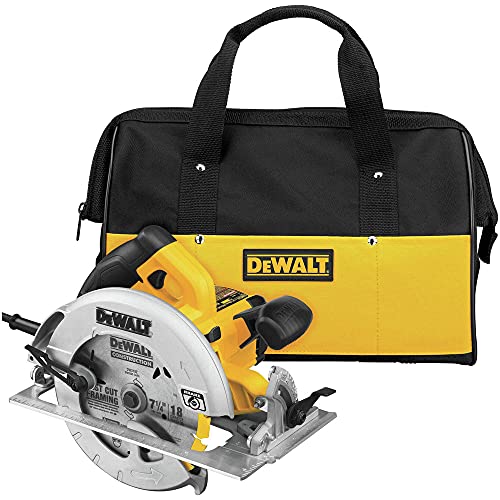
DEWALT Circular Saw, 7-1/4 inch, Pivoting with up to 57 Degree Bevel, Corded (DWE575SB)
- DEWALT 7 1/4 circular saw is among the lightest saws in its class (8.8 lbs.)
- Electric brake of the corded circular saw stops the blade after trigger is released
- 15 amp motor of the compact circular saw delivers power for even the toughest applications
New starting from: 179.00
Go to AmazonPrice: ~$130-150 | Blade Size: 7-1/4 inch | Weight: 8.8 lbs | Power: 15 amp corded
If arm fatigue is your enemy, this ultra-light saw makes long plywood cutting sessions bearable.
Why it handles plywood well:
- At 8.8 pounds, it’s one of the lightest full-size circular saws available
- 15-amp motor delivers 5,200 RPM—plenty for clean plywood cuts
- Electric brake stops the blade in 2-3 seconds, improving safety during sheet cutting
- 57-degree bevel capacity handles any angle you’d need for plywood projects
- ToughCord protection system prevents annoying cord damage
Real-world plywood experience: I borrowed a friend’s DWE575SB for a weekend closet project that required breaking down eight sheets of maple plywood. The weight difference from my Makita was immediately noticeable—I could make overhead cuts and awkward angles without the saw pulling my arms down.
The dust blower system is aggressive (maybe too aggressive—it blew sawdust everywhere in my enclosed garage). The electric brake is fantastic when you’re making multiple cuts on the same sheet and need to reposition quickly without waiting for the blade to coast.
Honest limitations: The lightweight aluminum base doesn’t glide quite as smoothly as Makita’s magnesium. Some users report the blade loosening over time, requiring regular tightening checks. The stock blade is garbage for plywood—budget another $40 for a proper finishing blade.
Best for: DIYers who cut plywood occasionally but want professional results. Anyone with shoulder or arm issues who needs a lighter saw. Budget-conscious buyers who want quality without breaking $150.
3. Milwaukee M18 FUEL 7-1/4″ Circular Saw (2732-20) – Best Cordless

Milwaukee 2732-20 M18 Fuel 18 Volt Lithium-Ion 15 Amp 7-1/4 Inch Cordless Circular Saw (Tool Only) (Non-Retail Packaging)
- Product will either come in original packaging that is in less than perfect shape and has been opened to inspect contents or will come in non-retail packaging (brown/white box or white/clear bag). Magnesium shoe and guards for maximum durability
- Integrated rafter hook for easy storage between cuts
- LED light for increased accuracy and visibility
New starting from: 269.00 $
Go to AmazonPrice: ~$280 tool only | Blade Size: 7-1/4 inch | Weight: 9.5 lbs with battery | Power: 18V brushless
For ultimate mobility when breaking down plywood sheets anywhere, cordless power is unbeatable.
Why it works for plywood:
- Brushless motor maintains 5,800 RPM even on battery power
- Rips hundreds of linear feet of plywood per charge with 5.0Ah battery
- Same 7-1/4-inch blade size as corded saws—no compromise in capacity
- Excellent sight lines keep cut visible through entire sheet
- Zero cord management when working with large plywood sheets on sawhorses
Real-world plywood experience: I used this saw at a friend’s house to help build his home office. No access to outdoor outlets, so we broke down all the plywood sheets in his driveway on a cordless setup. With two 5.0Ah batteries, we cut about 200 linear feet before needing to charge.
The power genuinely matches corded saws. I couldn’t tell the difference in cutting performance—it ripped through 3/4-inch birch plywood like it was plugged in. The freedom to position yourself anywhere around the sheet without tripping over cords is a massive workflow improvement.
Honest limitations: The battery adds expense—figure $280 for the saw plus $150+ for battery and charger if you’re not already in the M18 system. Battery weight makes it nose-heavy. You still need a plywood-specific blade (not included).
Best for: Contractors who cut plywood on jobsites. Milwaukee tool ecosystem users. Anyone who values cordless convenience and already owns compatible batteries.
4. Skil 5280-01 Circular Saw – Best Budget Pick
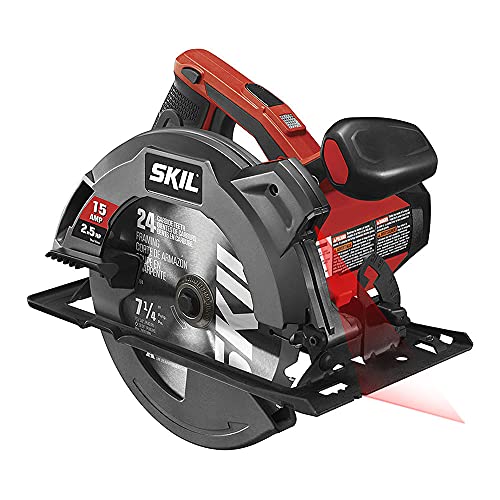
SKIL 15 Amp 7-1/4 Inch Circular Saw with Single Beam Laser Guide – 5280-01
- Powerful 15-amp motor delivers 5 300-RPM for greater speed and faster cuts
- 7-1 4-inch carbide-tipped blade included. Spindle lock for easy blade changes.
- 51° bevel capacity with a positive stop at 45° for a wide variety of cuts
List Price :
Offer: 62.78
Go to AmazonPrice: ~$60-70 | Blade Size: 7-1/4 inch | Weight: 8.1 lbs | Power: 15 amp corded
You don’t need to spend $150+ to get decent plywood cuts. This budget saw punches way above its price.
Why it’s surprisingly good for plywood:
- 15-amp motor delivers adequate power for plywood cutting
- Lightweight at 8.1 pounds makes extended use comfortable
- 52-degree bevel capacity handles most plywood projects
- Single-beam laser guide helps follow cut lines (when it works)
- Seriously affordable—often under $70
Real-world plywood experience: A DIYer friend bought this as his first circular saw for a garage storage project. I was skeptical about the price, but after watching it rip through several sheets of 3/4-inch ply (with a proper blade), I gained respect for it.
It’s not refined like the Makita or DeWalt. The base plate has more flex, the adjustments feel cheaper, and it’s noticeably louder. But for someone building a single project, it gets the job done without requiring a major tool investment.
Honest limitations: Build quality is basic plastic construction. The laser guide drains battery quickly and isn’t always accurate. Base plate may not stay perfectly square over time. Expect 3-5 years of life with regular DIY use, not 10+ like premium saws.
Best for: First-time buyers. Occasional DIYers building one or two plywood projects. Anyone who needs to stay under $100 total including a blade.
| Saw Model | Power | Weight | Key Advantage | Price |
|---|---|---|---|---|
| Makita 5007MG | 15A Corded | 10.6 lbs | Best overall quality | $160-180 |
| DeWalt DWE575SB | 15A Corded | 8.8 lbs | Lightest full-size | $130-150 |
| Milwaukee M18 FUEL | 18V Cordless | 9.5 lbs | Cordless freedom | $280 tool only |
| Skil 5280-01 | 15A Corded | 8.1 lbs | Best value | $60-70 |
The Blade Makes ALL the Difference: What Actually Works [2026 Models]
Here’s the truth: you could buy a $500 circular saw, but if you’re cutting plywood with a 24-tooth framing blade, you’ll get terrible results. Conversely, a $70 budget saw with a quality 60-tooth plywood blade will give you surprisingly clean cuts.
The blade is more important than the saw itself for plywood cutting.
Why Stock Blades Destroy Plywood
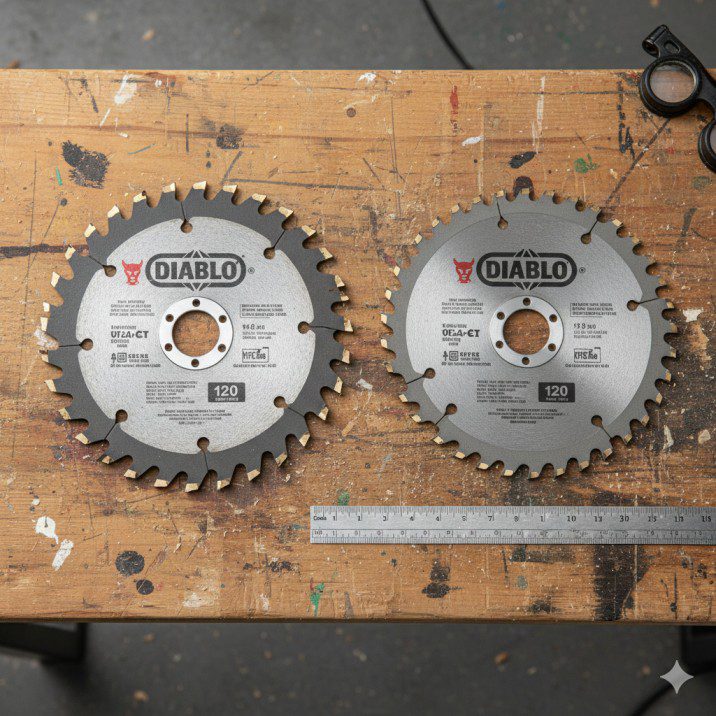
Most circular saws ship with general-purpose or framing blades. These have 18-24 teeth designed to rip through 2x4s and framing lumber quickly. That aggressive tooth design tears through plywood’s delicate veneer layers like a chainsaw.
I made this mistake on my first cabinet project. Used the blade that came with my saw. Every single plywood cut required 15 minutes of sanding to remove tearout and splinters. What should’ve been a weekend project stretched into two frustrating weeks.
The Perfect Plywood Blade: 40-60 Teeth with ATB Geometry
For clean plywood cuts, you need:
- High tooth count: 40 teeth minimum, 60-80 teeth for finish-quality cuts
- ATB (Alternate Top Bevel) design: Teeth angled to slice rather than rip through veneer
- Thin kerf: Reduces cutting resistance and motor strain
- Carbide tips: Stay sharp 10x longer than regular steel
- Anti-stick coating: Prevents pitch buildup that causes burning
Top Blade Pick: Freud Diablo D0740X (7-1/4″, 40-Tooth)

Diablo 7-1/4-Inch x 40 Tooth Finish Saw Blade for Wood – Ideal for Smooth Crosscuts in Hardwood, Softwood & Plywood – Tico Hi-Density Carbide, Perma-Shield Coating – D0740A
- High-Performance TiCo Hi-Density Carbide Teeth – Designed for smooth crosscuts in hardwood, softwood, and plywood, delivering a perfect combination of cutting speed and long-lasting durability.
- Perma-SHIELD Non-Stick Coating – Protects the blade from heat, gumming, and corrosion, ensuring superior cutting performance and extended blade life.
- Super Thin Laser-Cut Kerf – Provides fast, clean cuts with minimal material loss, optimizing cutting efficiency and delivering a smoother finish.
New starting from: 15.99 $
Go to AmazonPrice: ~$20-25 | Available: Amazon, Home Depot, Lowe’s
This is the blade I’ve used on 95% of my plywood projects. It’s the perfect balance of price, performance, and availability.
Why it excels on plywood:
- 40 teeth deliver clean cuts without overworking your saw motor
- ATB tooth design shears through cross-grain veneers without tearout
- TiCo carbide stays sharp through hundreds of linear feet
- Perma-SHIELD coating reduces friction and prevents burning
- Thin kerf makes cutting effortless, even through thick hardwood plywood
Real performance: I installed one of these on my Makita and cut an entire kitchen’s worth of maple plywood cabinets—probably 15 sheets total. The cuts were clean enough to use as-is with just light sanding. The bottom tearout was minimal, maybe 1/16 inch maximum on the exit side.
After all those cuts, the blade still cuts like new. I just wipe it down with mineral spirits every few months to remove pitch buildup.
For ultra-smooth cuts (60+ teeth): The Diablo D0760A with 60 teeth costs about $30 and delivers near-table-saw quality on hardwood plywood. Worth it for visible furniture edges.
Pro Tip: Always cut plywood with the “good side” facing down when using a circular saw. The blade rotates upward through the material, so tearout happens on the top surface. Flip your sheet and cut from the back to protect the finished veneer.
Essential Techniques for Perfect Plywood Cuts
Even with the perfect saw and blade, technique matters enormously when cutting plywood.
Supporting Full Sheets Properly
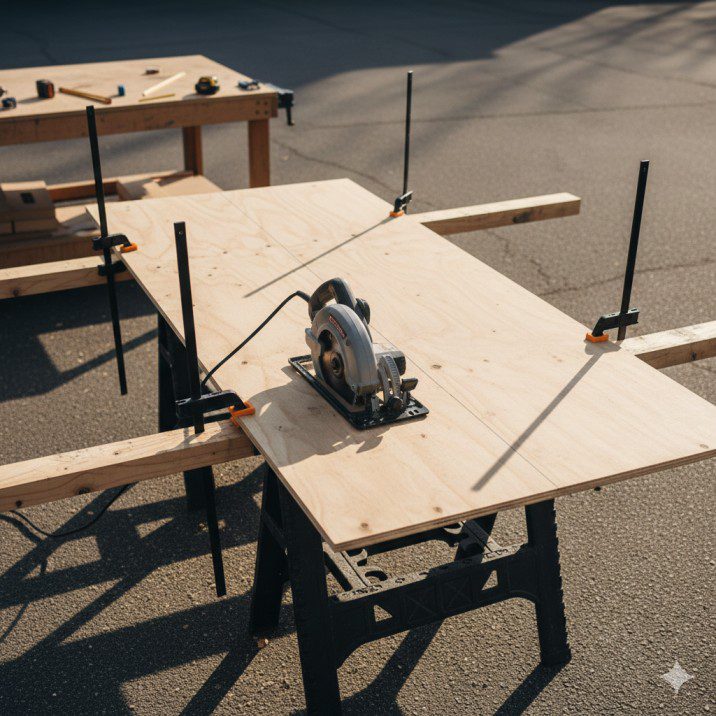
This is where most DIYers mess up. You need support on BOTH sides of your cut, or the unsupported section will sag and bind the blade.
My setup: two 2x4s laid flat on sawhorses, spaced so the cut line falls between them. The plywood rests on both 2x4s, and when I cut between them, both pieces stay supported. The blade barely touches the 2x4s underneath—I just adjust blade depth to cut maybe 1/16 inch into them.
Never use just two sawhorses at the ends of the sheet. The middle will sag during cutting and either bind your blade (dangerous) or create a curved cut (frustrating).
Blade Depth Setting
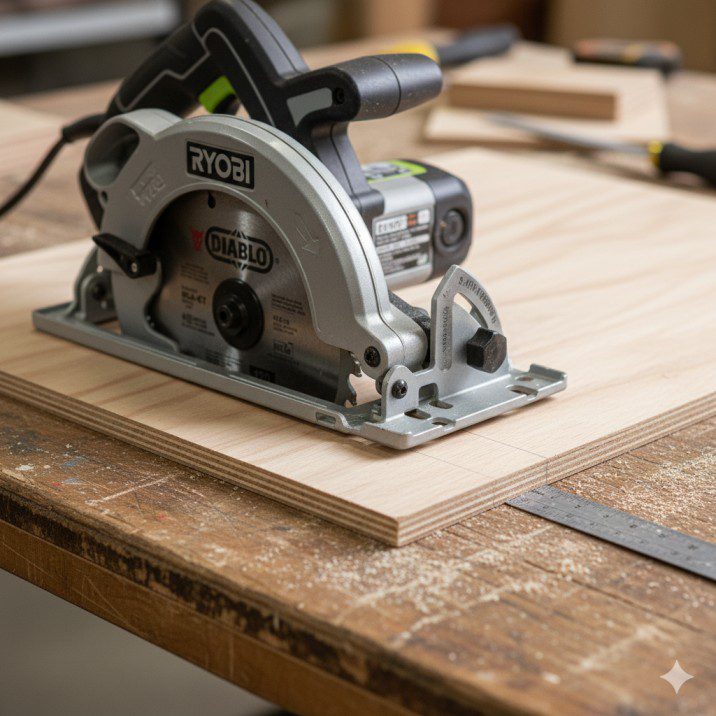
Set your blade to cut just 1/4 inch deeper than the plywood thickness. For 3/4-inch ply, that’s about 1 inch total blade depth.
Shallower blade depth means less tooth exposure, which reduces tearout on the bottom surface. It also makes the saw safer—less spinning blade exposed if something goes wrong.
I see people run their blades way too deep, thinking it cuts better. It doesn’t. It just creates more tearout and increases kickback risk.
Using a Straightedge Guide
Freehand plywood cuts rarely turn out straight. The sheet is too big, the saw wants to wander, and you can’t see your cut line clearly.
For straight cuts, clamp a straightedge to the plywood and run your saw’s base plate against it. I use a factory-edge piece of 1/2-inch MDF that’s 8 feet long and 10 inches wide.
Measure from your blade to the edge of the saw base (usually about 2 inches on most saws). Clamp your straightedge that distance away from your cut line. The saw runs along the edge, and the blade follows your mark perfectly.
Commercial track saw systems like Kreg Rip-Cut (~$40) or Festool guide rails (~$150+) make this easier, but a straight board works just fine.
Scoring for Zero Tearout
For finish-quality edges with absolutely zero tearout, use this pro trick:
- Set blade depth to barely score through the top veneer (maybe 1/8 inch deep)
- Make a light pass along your cut line
- Adjust blade to full depth and make the complete cut
The scoring cut severs the top veneer fibers cleanly before the full-depth cut passes through. This eliminates tearout almost completely.
I use this technique on furniture-grade hardwood plywood when edges will be visible. It adds an extra minute per cut, but the results are worth it.
Feed Rate and Pressure
Push steadily forward without forcing the saw. If you’re straining to push, either your blade is dull or you’re moving too fast.
The saw should glide forward with moderate pressure. Listen to the motor—it should maintain consistent pitch. If the motor sounds like it’s struggling or slowing down, ease up on your feed speed.
Plywood burns easily if you move too slowly. Keep the saw moving steadily, don’t pause mid-cut, and you’ll avoid those ugly black burn marks.
Common Plywood Cutting Mistakes (I’ve Made Them All)
Mistake 1: Cutting on Concrete or Hard Surfaces

I’ve watched people lay plywood directly on concrete and cut through it, blade dragging on the ground. This destroys your blade in one cut and creates massive bottom tearout.
Always use sacrificial support. I put 2-inch foam insulation boards under plywood when cutting on concrete. The foam compresses slightly, supporting the sheet while letting the blade pass through without hitting concrete.
Mistake 2: Measuring from the Wrong Edge
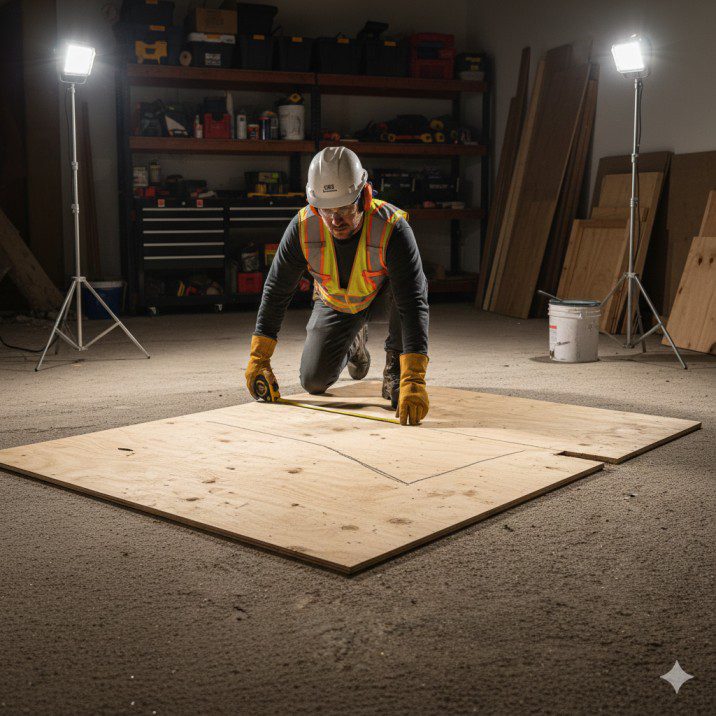
Plywood sheet edges aren’t always perfectly square or straight. If you measure from the factory edge assuming it’s accurate, your cuts might be off.
On my first cabinet project, I measured everything from what I thought was a square corner. None of my cabinet boxes were actually square because that factory edge was 1/8 inch out of square over 48 inches.
Now I always trim 1/2 inch off one factory edge with a straightedge guide, creating a known-good reference edge for all measurements.
Mistake 3: Wrong Cutting Direction
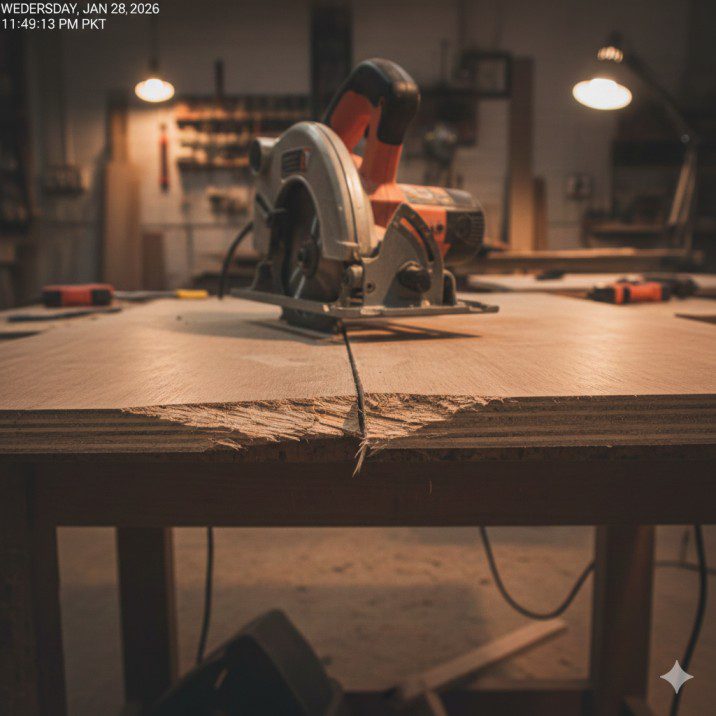
Cut plywood from the back side (ugly veneer facing up) when using a circular saw. The blade rotates upward through the material, so tearout occurs on top. Flip your sheet and protect the finished surface.
I still see experienced woodworkers forget this and end up with torn veneer on the visible side. It’s such an easy fix—just remember: good side down.
Mistake 4: Dull Blades
A dull plywood blade causes burning, tearout, and requires twice the effort to push through cuts. If you notice any of these symptoms, it’s time for a new blade.
I replace my Diablo plywood blade after about 300-400 linear feet of cutting, or when I notice burn marks starting to appear. At $20-25 per blade, it’s cheap insurance for quality cuts.
Safety Considerations for Plywood Cutting
Plywood sheets create unique safety challenges that don’t exist with smaller lumber.
Sheet Stability

Large plywood sheets catch wind easily. I’ve had full sheets blow off sawhorses when a strong gust hit. Always work in a location protected from wind, or weight down the sheet edges.
When cutting in my driveway, I put heavy tools (like my cordless drill and impact driver) on opposite corners of the sheet to keep it from shifting.
Kickback Risks

Plywood kickback is less common than with dimensional lumber, but it still happens if:
- The kerf closes during a rip cut and pinches the blade
- You’re cutting warped plywood that binds mid-cut
- The unsupported section sags and pinches the blade
Always maintain firm control with both hands. Position yourself to the side of the saw, never directly behind it, so if kickback occurs you’re out of the path.
Dust Control
Plywood creates ridiculous amounts of fine dust—way more than solid wood. The glue between layers breaks into fine particles that stay airborne for hours.
I wear a respirator (N95 minimum, P100 is better) for extended plywood cutting sessions. Even cutting outdoors, the dust cloud is significant.
If you’re cutting indoors, connect a shop vac to your saw’s dust port if it has one. It won’t catch everything, but it helps.
Hearing Protection
Circular saws are loud. Extended exposure damages your hearing permanently. I wear foam earplugs rated for 33dB noise reduction for every cut, even quick ones.
Your hearing doesn’t grow back. Protect it.
Ready to level up your workshop? Check out our complete table saw buying guide for more cutting solutions, or browse our expert saw reviews for detailed comparisons.
My Honest Recommendation: Which Saw Should You Actually Buy?

After cutting hundreds of plywood sheets with various circular saws over six years of woodworking projects, here’s my straight answer:
For most DIYers building plywood projects: Buy the Makita 5007MG ($160-180) plus the Diablo D0740X blade ($20-25). Total investment around $200 gets you a saw-and-blade combination that’ll last 10+ years and deliver professional-quality plywood cuts.
The Makita hits the sweet spot of power, weight, durability, and price. It’s light enough for all-day use but substantial enough to track straight cuts accurately. The magnesium construction means it’ll still be cutting perfectly a decade from now.
If you’re on a tight budget (under $100 total): The Skil 5280-01 ($60-70) plus Diablo D0740X blade ($20-25) gets you acceptable plywood cutting for under $100. It won’t last forever, but it’ll complete several projects reliably.
If you want cordless freedom and already own Milwaukee M18 batteries: The M18 FUEL 2732 ($280 tool only) delivers corded-equivalent performance without the cord hassle. Perfect for jobsite work or if your workshop lacks convenient outlets.
If lightweight matters most (shoulder/arm issues): The DeWalt DWE575SB ($130-150) weighs just 8.8 pounds and reduces fatigue significantly on long cutting sessions. Add the Diablo blade and you’re still under $180 total.
My personal setup: I use the Makita 5007MG with a Diablo D0740X blade for 90% of my plywood work. For ultra-smooth furniture cuts, I swap to a Diablo D0760A (60-tooth) blade. This two-blade system handles everything from rough shop shelving to hardwood plywood furniture.
Whatever saw you choose, invest in a quality plywood blade immediately. That $20-30 blade upgrade makes a bigger difference than spending $100 more on a fancier saw.
Want to see how these saws compare to other cutting tools? Visit our detailed comparison guides or learn cutting techniques in our how-to tutorial section.
Frequently Asked Questions
What is the best circular saw blade for cutting plywood?
The Freud Diablo D0740X (40-tooth, 7-1/4 inch) is the best overall plywood blade for circular saws at around $20-25. It features ATB (Alternate Top Bevel) tooth geometry that slices cleanly through plywood’s cross-grain veneers, TiCo carbide tips for durability, and anti-stick coating to prevent burning. For ultra-smooth furniture-grade cuts, upgrade to the Diablo D0760A with 60 teeth. Never use the stock 24-tooth framing blade that comes with most saws—it will tear plywood veneer badly.
How do I prevent tearout when cutting plywood with a circular saw?
Prevent tearout by using a high tooth-count blade (40-60 teeth minimum), cutting with the good side facing down (blade rotates upward, so tearout occurs on top), setting blade depth only 1/4 inch deeper than plywood thickness, and using a straightedge guide for clean tracking. For zero-tearout cuts on visible edges, score the cut line first with blade depth set to 1/8 inch, then make the full-depth cut. Supporting both sides of the cut prevents binding that causes additional tearout.
Can I cut a full 4×8 sheet of plywood with a circular saw?
Yes, circular saws are actually the best tool for breaking down full 4×8 plywood sheets safely. Set the sheet on two 2x4s laid across sawhorses, positioned so your cut line falls between them for continuous support. This prevents the saw from bogging down or the plywood from binding mid-cut. Cutting full sheets on a table saw alone is dangerous and awkward—bringing a circular saw to the material is much safer and requires less workshop space.
What’s better for cutting plywood: corded or cordless circular saw?
For regular plywood cutting, corded circular saws deliver more consistent power and never run out of charge mid-project. Models like the Makita 5007MG provide unlimited runtime for breaking down multiple sheets. Cordless saws like the Milwaukee M18 FUEL offer excellent mobility and adequate power for most plywood cutting, but require battery management and add weight. If you already own compatible batteries, cordless works great. If starting fresh, corded provides better value for shop-based plywood work.
Why does my circular saw burn plywood edges when cutting?
Plywood edge burning happens when blade friction generates excessive heat, usually caused by: dull blades with worn carbide tips, moving too slowly during the cut, binding from improper support, or using a blade with too few teeth. Replace or sharpen your blade if it has over 300 linear feet of cuts, maintain steady forward feed without pausing, ensure both sides of the cut are supported to prevent binding, and use a 40-60 tooth plywood-specific blade instead of framing blades. A sharp blade cuts cool.
Affiliate Disclosure: This article contains affiliate links to products available on Amazon and other retailers. If you purchase through these links, we may earn a small commission at no additional cost to you. This helps support our website and allows us to continue providing honest, detailed plywood cutting guides based on real workshop experience.

Finlay Connolly is a woodworking enthusiast and power tool specialist with over a decade of hands-on experience in the workshop. As the founder and lead writer at ProTableSawReviews.com, Finlay combines expert knowledge with real-world testing to help woodworkers, DIYers, and professionals choose the best tools for the job. With a sharp eye for detail and a passion for precision, Finlay is committed to providing trustworthy, practical advice backed by years of experience and research in the field. Whether you’re cutting dados or comparing fence systems, you can count on Finlay for honest, reliable reviews that make your next cut your best one.